Nowadays, smartphones have become an important part of our lives. From taking photos to video calling and online shopping, we use the phone for every task. But do you know that there might be some such apps in your phone, which are secretly using your camera or microphone? To keep your privacy safe, Android smartphones ae provided with several such great features, with the help of whicj you can find out which app is using your phones camera or mic and if needed turn off their permissions. So let us know how to block access to apps secretly using the phone's camera and mic.
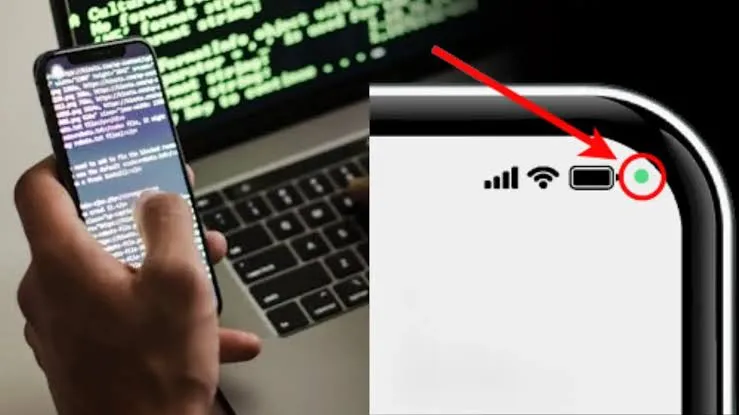
Identify with Green Indicator
In smartphones with Android 12 and later versions whenever any app uses the camera or microphone in the background, a green dot or indicator appears at the top right corner of the screen. If you see this dot, swipe down from the top of the screen and tap the indicator. This will immediately show you which app is using the camera or microphone.
Turn off access from Quick Settings
If you want that no app can suddenly use the camera or microphone, pull down the phones screen twice from the top. Open 'Quick Settings,' here you will find tiles (icons) for 'Camera Access' and 'Microphone Access.' By clicking on these you can completely turn off camera or mic access.
Change permissions in App Settings
Go to phone settings and click on 'Apps'. After this select the app on which you suspect or whose permissions you want to check. Go to 'Permissions' and check whether it has received camera and mic access or not. Of that app does not need it, set the permission to 'Don't allow' or 'Ask every time'.
Use Privacy Dashboard
Open your phone settings, go to Privacy Dashboard inside privacy. Here you can see the complete data of the last 24 hours regarding which apps used your camera or mic and hown many times.
Uninstall unknown apps
If there is any such app in your phone that you do not use, or it there is any unknown third-party app, uninstall it immediately.
Android Privacy Guide: Is an App Accessing Your Camera and Micz? Here’s How to Stop It Immediately
TheFearless
20 Oct 2026 · 12:35 PM IST
Related Stories